Windows & macOS

Stop hunting files.
Start doing work.

Deckspace acts like a dedicated desk for each of your projects. Drag any file onto a Deck and Deckspace remembers the connection. Come back the next day and your project desk is exactly as you left it.

↓ Download See how it works

14-day free trial · No account needed

D Deckspace
Bridge Upgrade 3
Design Drawings
Site Reports
Client Correspondence
Thesis 2025 2
Literature
Data & Analysis
Safety Audit 4
Checklists
Photos
Final Report
Design Drawings 5 portals
M S L Birds ≡
DWG
Foundation_Plan_v3.dwg
\\Server\CAD
PDF
Structural_Specs.pdf
OneDrive
XLS
Load_Calculations.xlsx
Desktop
DOC
Scope_of_Works.docx
OneDrive
PDF
Approval_Certificate.pdf
3.2 MB
+
Drop files
here
File Explorer
📁 C:\Users\engineer
📁 Projects
📁 Bridge Upgrade
📁 Safety Audit
📁 Downloads
📁 Desktop
☁️ OneDrive
🌐 Network Drive
📁 Shared\CAD
📐 Foundation_Plan_v3.dwg
The problem

Your files are scattered.
Your brain isn't.

You think in projects. Windows thinks in folders. Your files are scattered across locations. Your focus pays the price. Deckspace brings them together, without moving a single one.

Project: Bridge Upgrade
📄 Structural_Specs.pdf OneDrive
📊 Load_Calculations.xlsx Desktop
📝 Scope_of_Works.docx OneDrive\Docs
📐 Foundation_Plan.dwg \\Server\CAD
📄 Approval_Cert.pdf Downloads
📊 Cost_Summary.xlsx C:\Projects
Design Drawings Deck
📄 Structural_Specs.pdf
📊 Load_Calculations.xlsx
📝 Scope_of_Works.docx
📐 Foundation_Plan.dwg
📄 Approval_Cert.pdf
📊 Cost_Summary.xlsx
How it works

See it in action.

Seven things Deckspace does that File Explorer can't.
▶ Seven things Deckspace does that File Explorer can't.
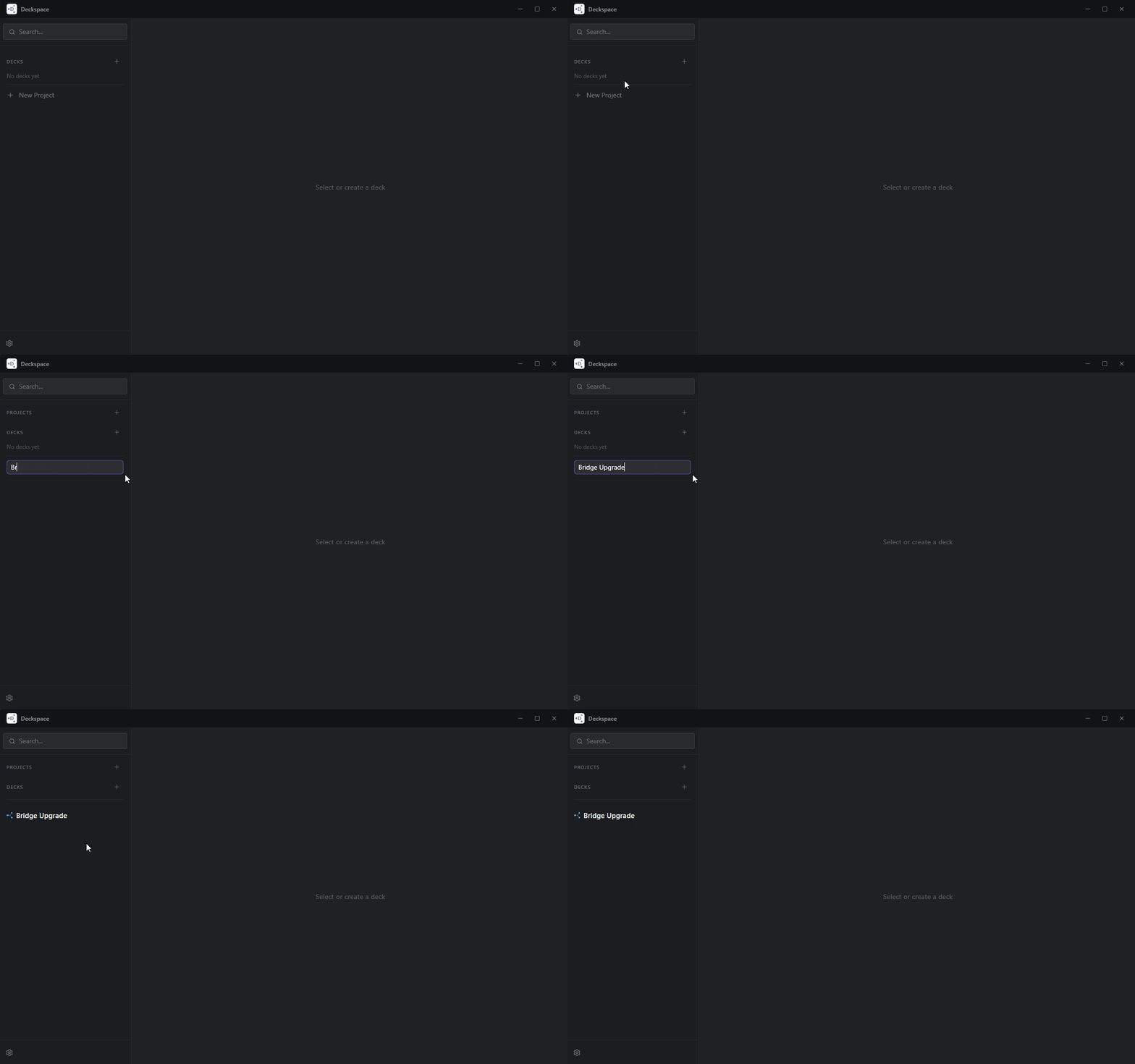
Step 1
Step 1: Create a Project

Your work, grouped the way you think.

One click. A name. A colour. Suddenly your workspace reflects how your brain actually works: by projects, not by folder path.

Projects live in the sidebar, like channels in Slack
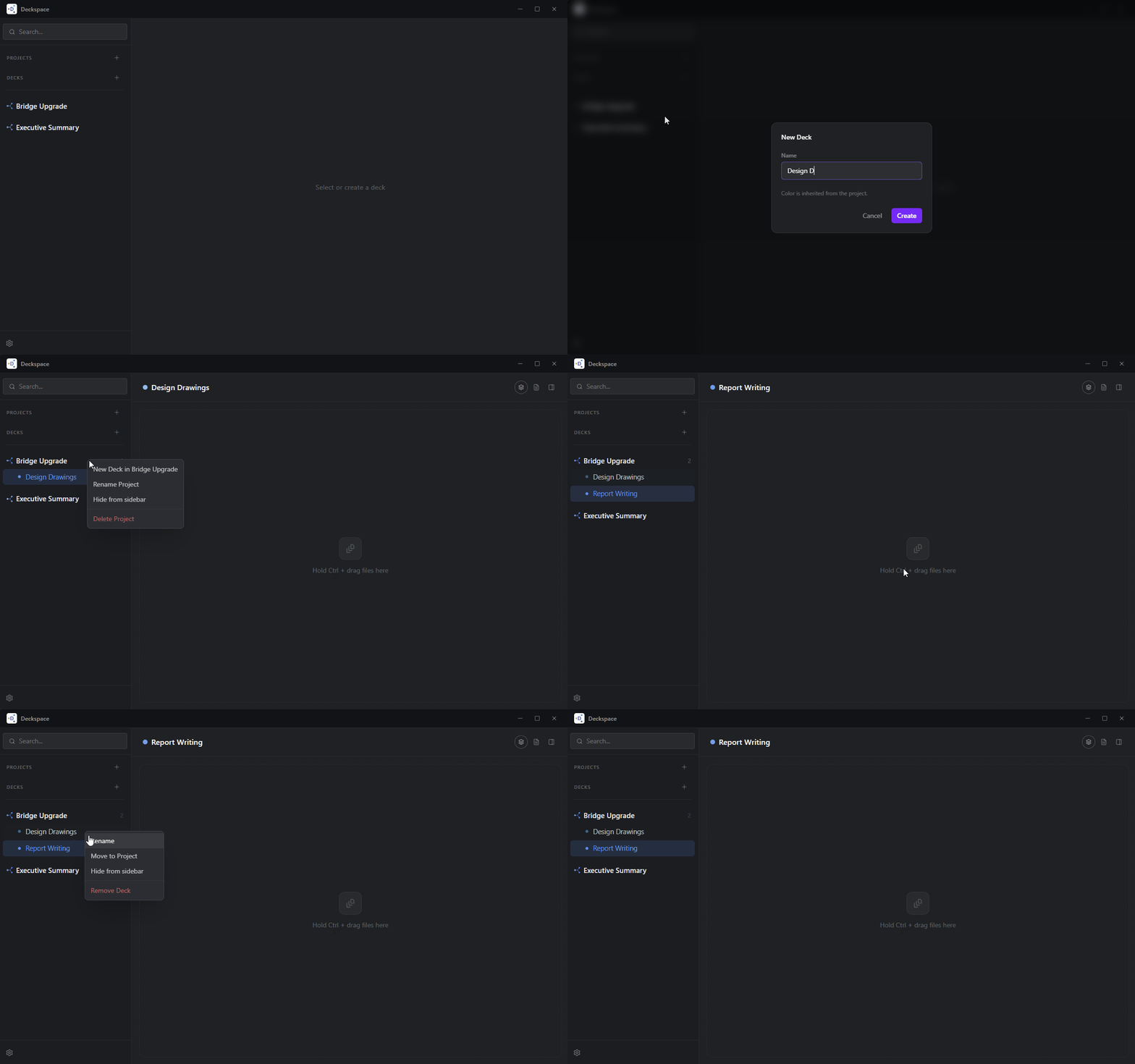
Step 2
Step 2: Create a Deck

Break projects into focused workspaces.

One project. As many Decks as you need. Split by task, by deliverables, or by client; whatever makes sense for how you work. Each Deck is its own focused view. No clutter from files that don't belong there.

  • Unlimited Decks per Project
  • Segregate by colour.
  • Rename or reorder as the project changes
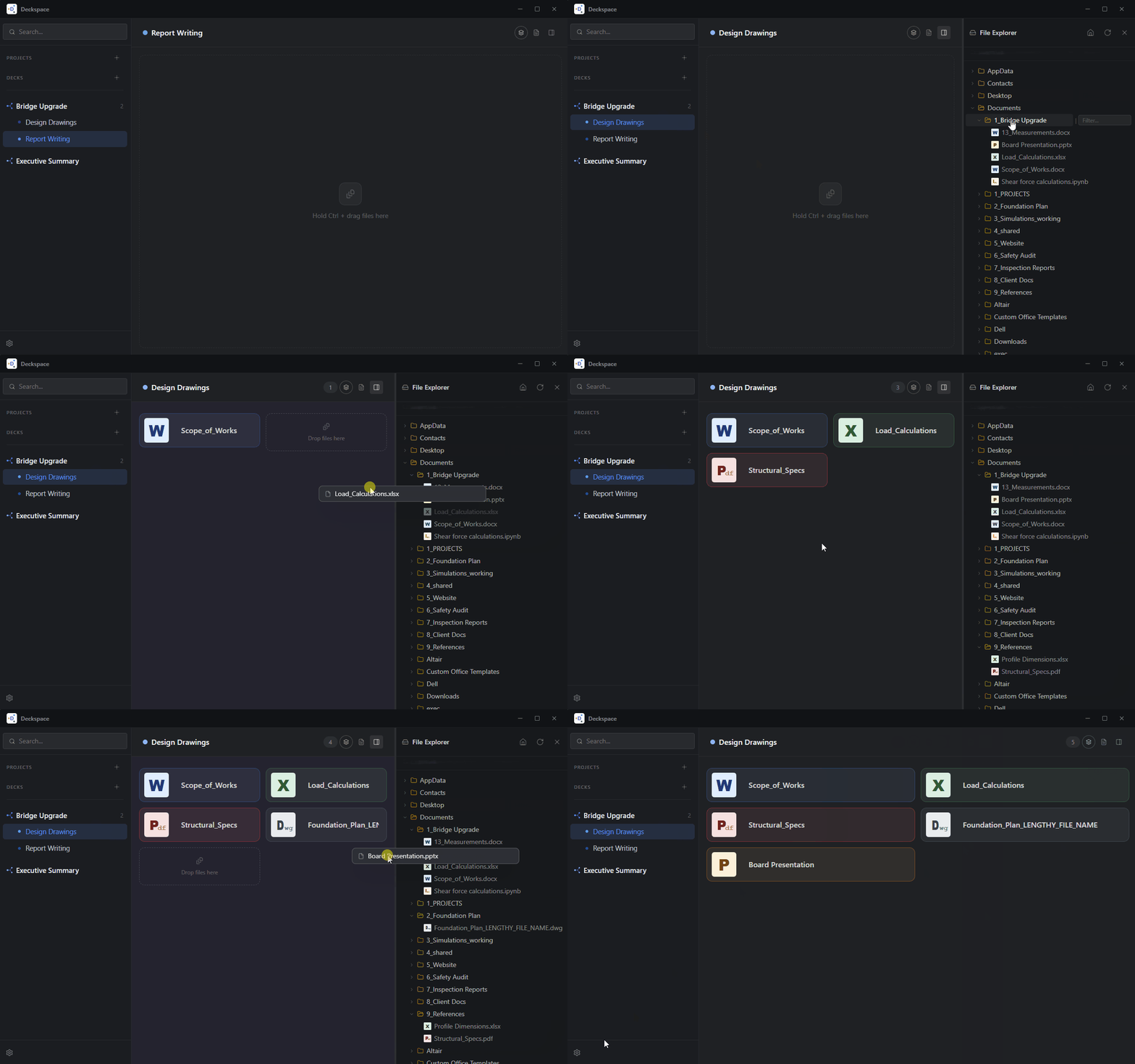
Step 3
Step 3: Portal a file

Any file. From anywhere. One drag.

Find your file through the in-built Explorer panel. Drag it on to the deck. Done. A portal is created to the original file. Deckspace just remembers the connection.

The original file stays exactly where it is. Always.
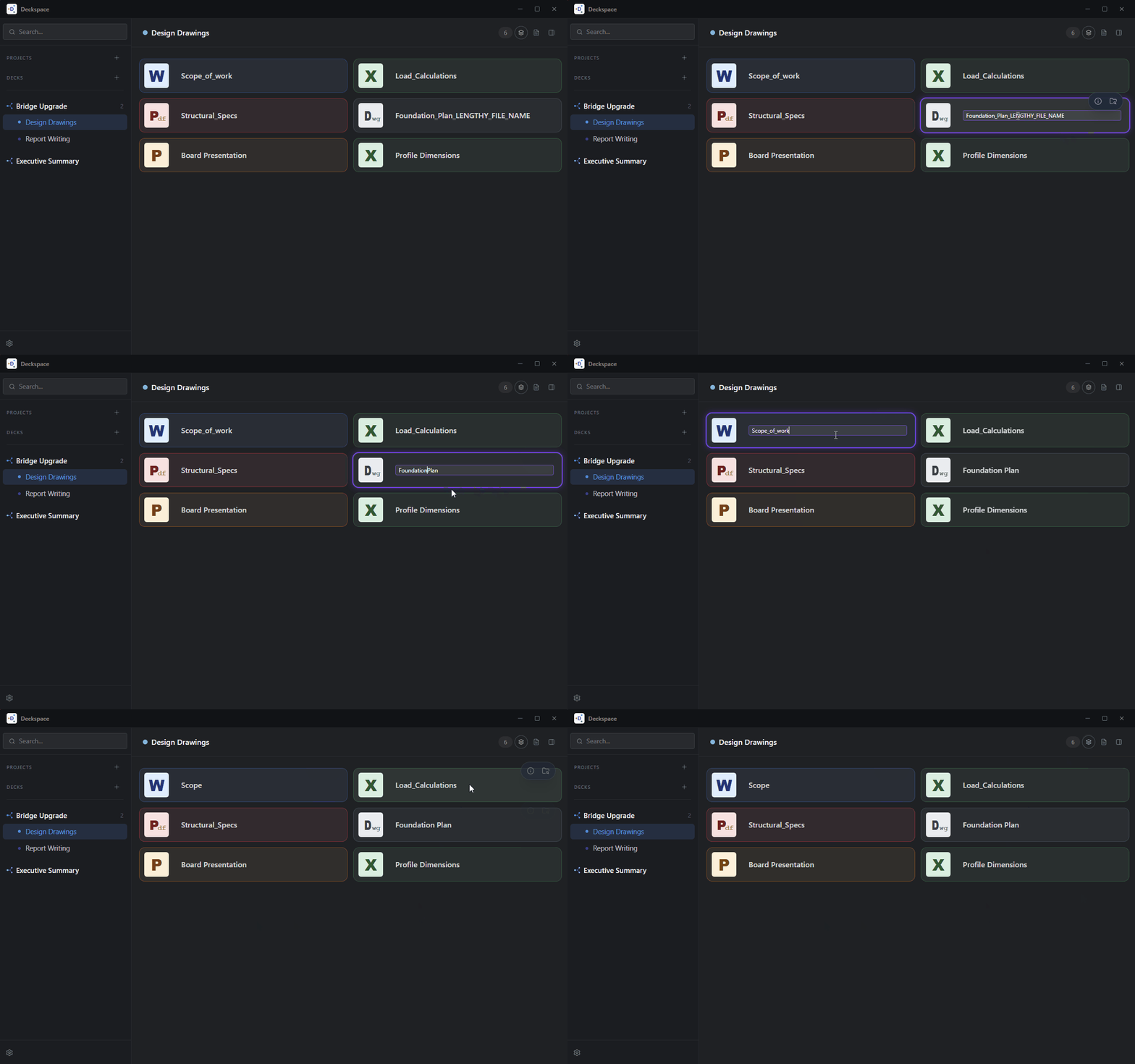
Step 4
Step 4: Rename & organise

Your labels. Instant order.

Your labels. Your order. Rename any portal; the original file is untouched, only your label changes. Then hit Birds of a Feather and watch the deck sort itself. PDFs together, spreadsheets together, drawings together. One click.

Your custom name. Your order. Original file remains untouched.
Step 5
Step 5: Locate, copy, share

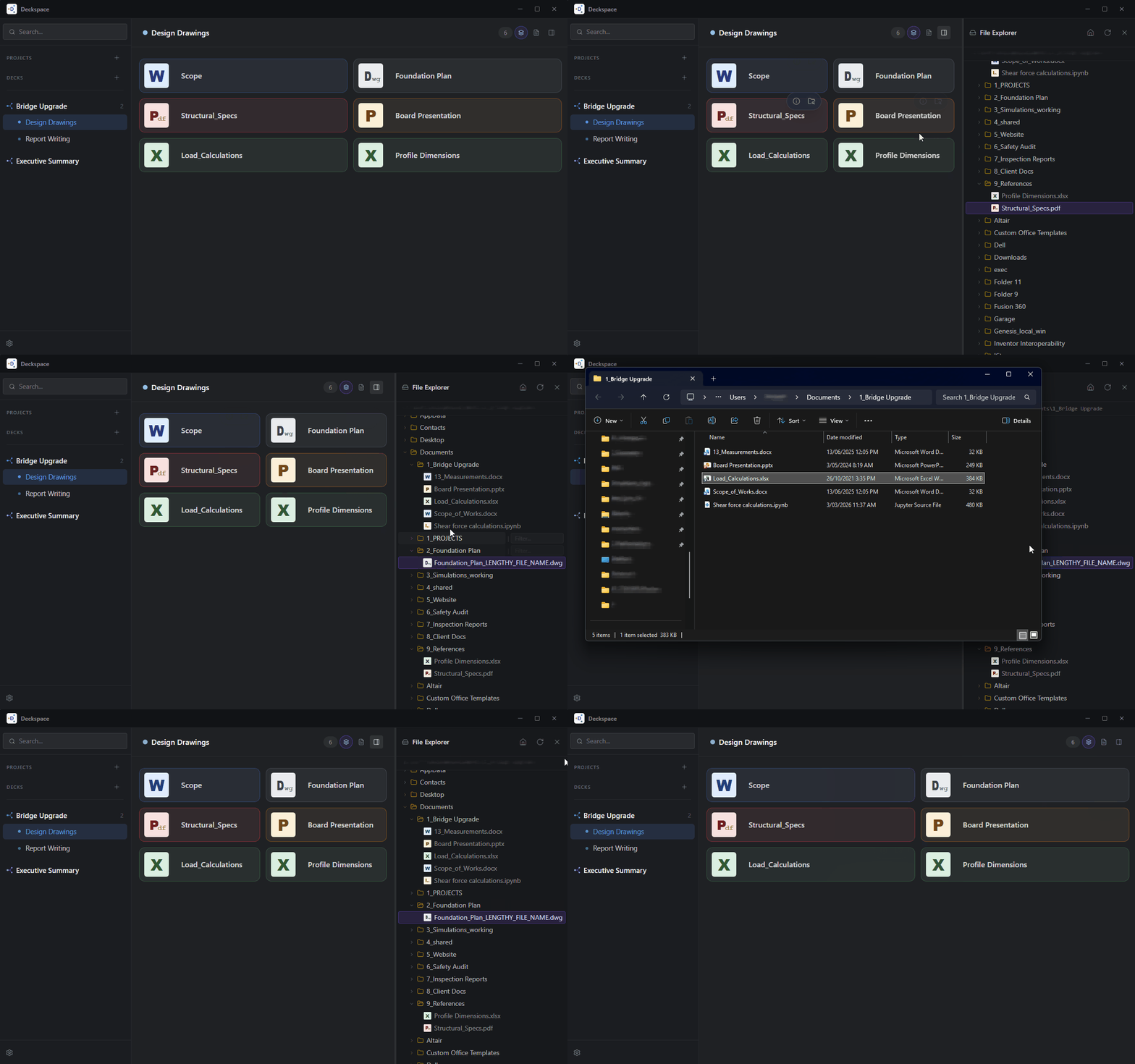
Find the original location in one click.

Right-click any tile. You get three powers:

  • Locate: find it in the Explorer panel instantly.
  • Copy path: grab the full path to share.
  • Open in Explorer: jump straight to it in Windows.
Step 6
Step 6: The info panel

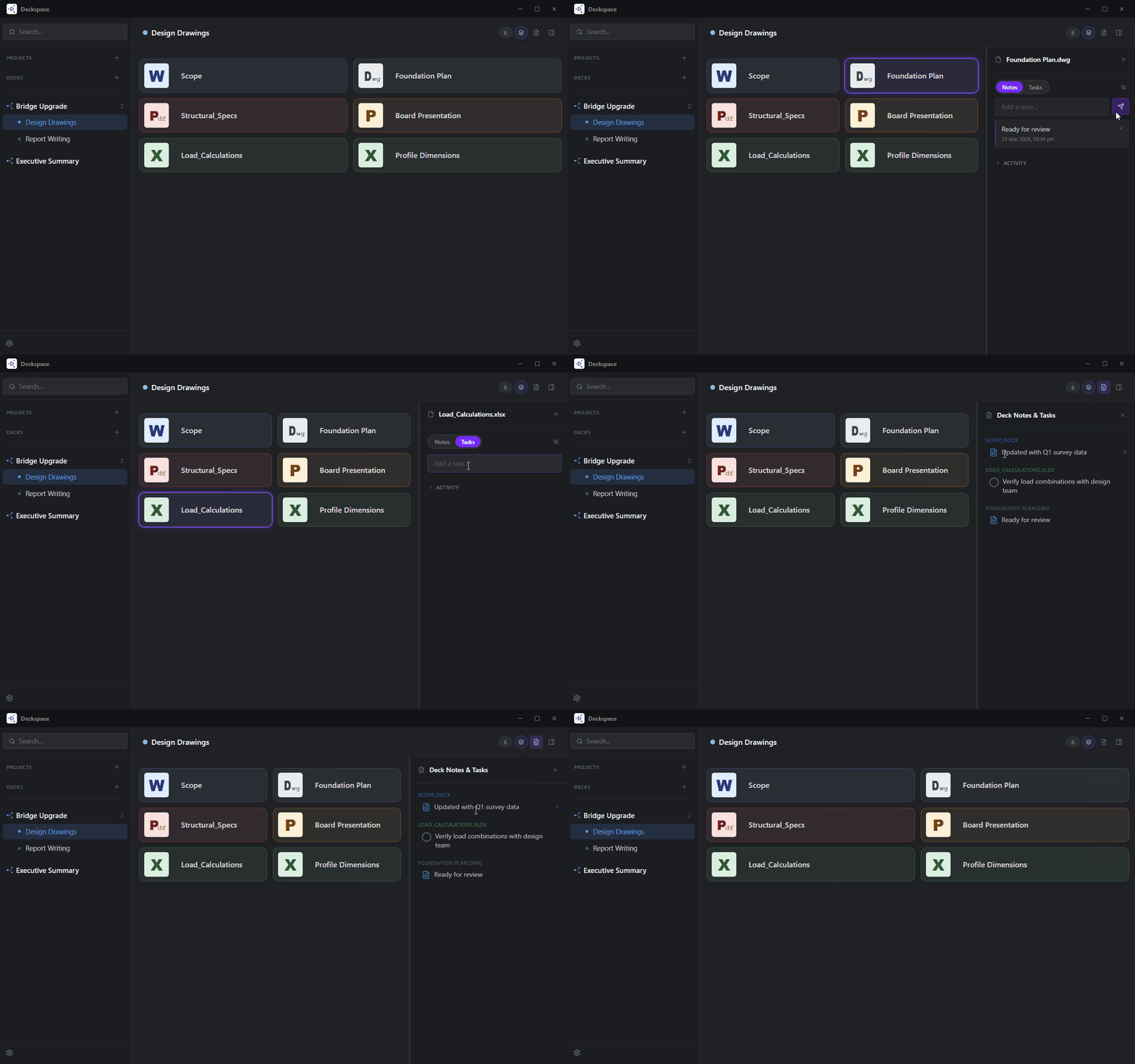
Notes and tasks, attached to the file.

Every file has a story. Now you can keep it. Click the info icon and a panel slides open: notes, comments, and a full activity log, all attached to that one file.

  • Notes: revision status, who sent it, what still needs checking.
  • Comments: a timestamped thread that builds over time.
  • Activity log: every time you opened it, automatically recorded.
Tasks and notes stay attached to the file.
Step 7
Step 7: Settings

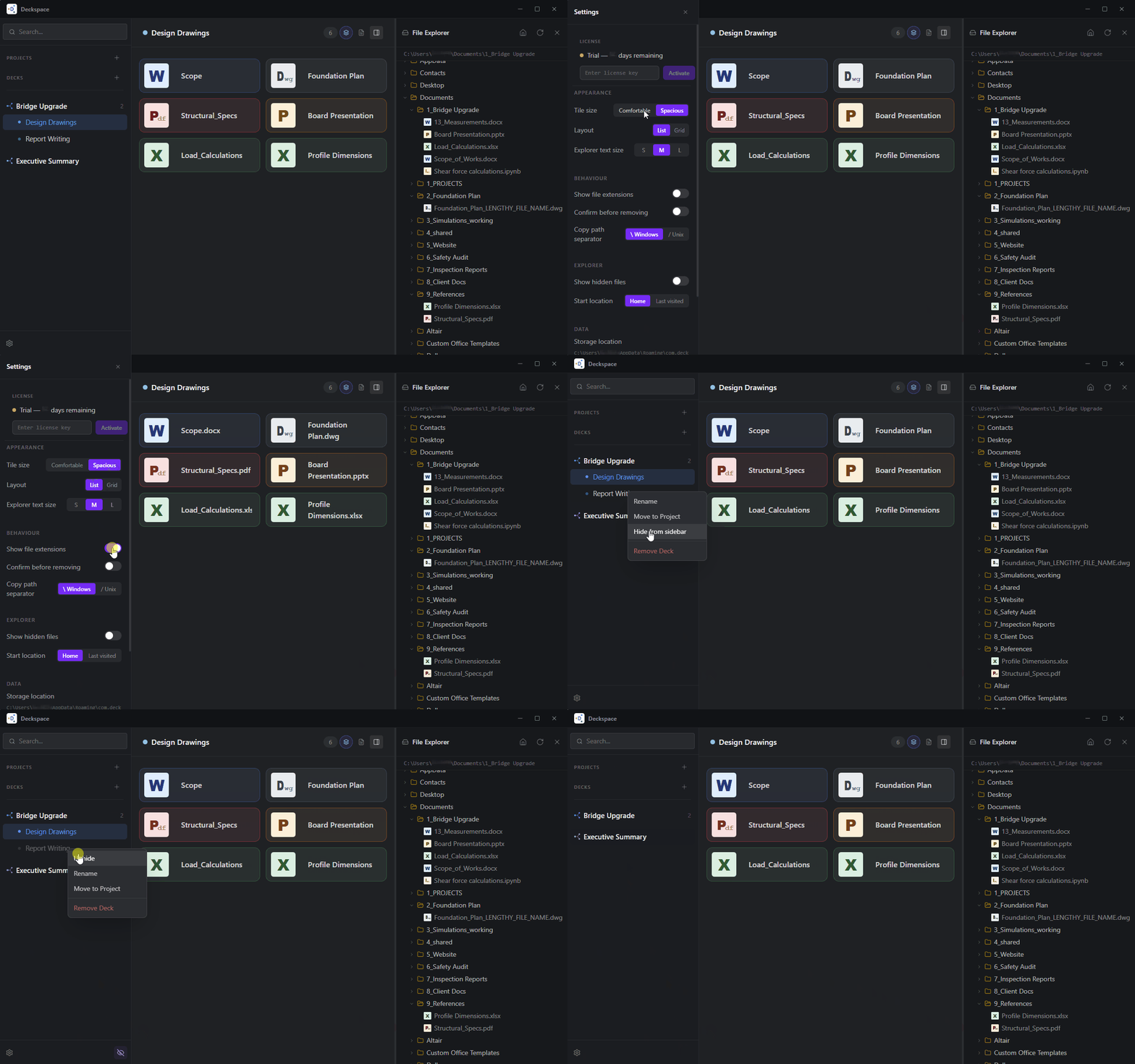
Tune it to how you work.

Your setup. Your rules. Tile size, text size, hidden files, confirm before remove. Small decisions that make a big difference to how the app feels every day.

  • S / M / L tiles: see more, or see clearly.
  • Text size: readable at any screen size.
  • Hidden files: on or off, instantly.
  • Confirm before remove: accidents don't happen here.
Everything else you get
👁

Visual file recognition

Know what's what before you read a word. Color-coded by file type. Your eye does the work so your brain doesn't have to.

🐦

Birds of a Feather

One click sorts the whole deck. PDFs together. Spreadsheets together. Drawings together. Order from chaos, instantly.

Drag to reorder

Drag tiles into any order. Most-used files at the top. Organised by phase, by importance, by whatever makes sense today.

📡

Broken portal detection

Files move. Deckspace keeps up. If a portal breaks, Deckspace spots it and helps you relink in one click. Your Deck structure survives even when files migrate.

⚙️

Settings you actually use

Tile size (S / M / L), explorer text size, hidden files toggle, path separator format, confirm-before-remove. Tuned to how you work.

💾

Everything persists

Close Deckspace, restart your PC, come back a week later. Your Decks, notes, and activity wait exactly where you left them. No cloud. No account. Yours.

File types

If Windows opens it,
Deckspace portals it.

DOC
Word Documents
XLS
Excel Spreadsheets
PDF
PDF Files
DWG
CAD Drawings
CSV
CSV / Data
PPT
PowerPoint
ZIP
Archives
TXT
Text Files
IMG
Images
ANY
Any format

+ folders, network paths, and any filetype Windows can open.

What Deckspace is not

It doesn't replace
what you already use.

Deckspace sits alongside your existing tools.
It organises the connections, not the files themselves.

Not cloud storage No files are uploaded anywhere. OneDrive and Dropbox still do their job.
Not a sync tool Nothing syncs or copies. Your files stay exactly where they are.
Not a note-taking app Notion and Obsidian do that. Deckspace just lets you attach context to real files.
Not a search tool Everything/voidtools still wins for search. Deckspace is for when you already know what project you're in.
Not a replacement for File Explorer They work together. Deckspace has its own explorer panel, but it doesn't replace Windows.
Not a subscription One-time purchase. No ongoing cloud service means no ongoing charge. Yours forever.

"I built Deckspace because I was spending 15 minutes every morning hunting through File Explorer. It wasn't a tools problem. It was an organisation-by-project problem."

Creator of Deckspace · PhD Student / Engineering Consultant

Try with no commitments.

Install and use Deckspace for 14 days with no restrictions. No credit card.
If it saves you time, buy it once for life. No subscription.

Windows 10 / 11 · macOS · <12 MB installer

By downloading you agree to receive occasional (only necessary) product updates. Unsubscribe anytime.

Already tried it?